
CamoGraphy3.7.53 - App Store
You'll be able to see results in few seconds.
Publisher Description
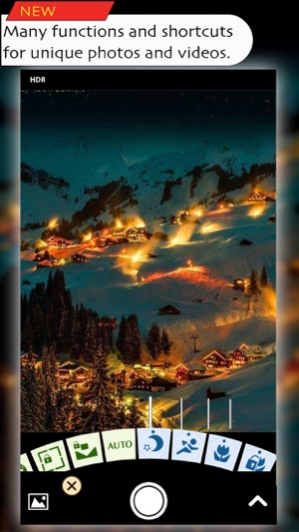


√ Minimum battery consumption for recording videos and taking photos
√ HDR photography for the most difficult lighting situations.
• You can adjust the input pictures, such as fusion.
• You can save input pictures taken for HDR separately and load them later
√ ISO and shutter speed priority, controls.
• When you adjust ISO manually. shutter speed adjusts automatically.
• When you adjust shutter speed manually. ISO adjusts automatically.
• Manual controls over exposure, focus, white balance and colour tint, and many more.
• 4 Preset programs, 2 lens programs ( macro and long shot ), 2 shutter programs ( low light and fast subjects ).
√ Video recording with ability to pause.
• You can also merge your videos from the photo library.
Other Camera features :
√ Timer with consequent number of shots and warning flash.
√ Camera burst mode captures up to 30 frames per second in 1920 x 1080 pixel.
• You can make collage photos out of your videos.
√ Stabilizer ( anti shake ).
√ Live preview.
Photo managing :
√ Delete multiple photos at once from the device camera roll.
√ View medias additional information like EXIF data from camera roll.
Other Editing features :
√ Professionally designed artistic color effects.
• 29 color effects, you can adjust :
- Intensity
- Gradient
- Basic adjustments
- Vignette.
• For some effects you can also adjust :
- Tint color
- Bleach intensity.
√ Basic Adjustments :
- Basic adjustments with use of processing on raw data. so adjusting one will not affect others.
- Quality of images don't degrade as user stacks or undos since this does not use compressed JPEGs for stacking history modifications.
• Shadows
• Brightness
• Exposure
• Contrast
• Fade
• Hue
• Grain
• Saturation
• Vignette
- You can adjust center, radius and color of the vignette.
• Sharpness.
√ Colorize
• Mono Color
• Radial black and white
- Ideal for applying lens vignette.
• blends include :
- Shadows ( screen )
- Midtones ( Soft light )
- Highlights
- Overlay
- Exclusion
- Hard light
- Darken
- Lighten
- Difference
- Negation
- Multiply
- Dodge
- Burn
• Posterize
√ Lenses
• Dept of field
• Tilt shift vertical and horizontal.
• Bulge
• Pinch
√ Borders
• 25 borders combinations.
√ Adding GPS information to pictures and view picture detail data.
√ Crop and rotate picture.
√ Quick and fast one place shoot and edit.
√ Very low battery consumption when editing pictures.
Sharing :
√ Instagram, Twitter, Facebook*, Flickr*, Email and many more.
* Facebook and Flickr sharing requires their relative apps be installed on your device.
Development:
Roham Akbari
Feb 10, 2018 Version 3.7.53
√ Confirm button is available for tapping on after first video recording session. ( Fixed )
-= From previous updates =-
√ Absolute macro lock.
• It lock's the lens to focus on closest possible range without auto adjustments.
√ Absolute distance lock.
• It lock's the lens to focus on farthest possible range on the device, without auto adjustments, so distance subjects are always in focus.
√ When you make an in-app purchases you can restore it on your other devices.
√ A problem with capturing light trail photos from existing videos have been resolved.
• You can capture all multiple exposure modes for your videos, by selecting slow shutter mode when in video preview.
√ Cinematic video stabilization support, has been added.
√ Optical image stabilization during video recording.
• For iPhone 6 plus, 6s plus, 7 plus.
√ Timelapse video recording has been added.
√ Trim or export videos in fast motion or slow motion.
√ Ability to trim videos up to one frame precision.
√ Camera view menus are re-arranged.
√ Zoom control has been changed.
√ Moving video files to camera roll, instead of copying them.
• Copying requires twice the free storage size of the video file.
√ FTP sharing has been added.
√ Ability to store photos in uncompressed format (TIFF).
About CamoGraphy
The company that develops CamoGraphy is bioDigits LTD.. The latest version released by its developer is 3.7.53.
To install CamoGraphy on your iOS device, just click the green Continue To App button above to start the installation process. The app is listed on our website since 2018-02-10 and was downloaded 0 times. We have already checked if the download link is safe, however for your own protection we recommend that you scan the downloaded app with your antivirus. Your antivirus may detect the CamoGraphy as malware if the download link is broken.
How to install CamoGraphy on your iOS device:
- Click on the Continue To App button on our website. This will redirect you to the App Store.
- Once the CamoGraphy is shown in the iTunes listing of your iOS device, you can start its download and installation. Tap on the GET button to the right of the app to start downloading it.
- If you are not logged-in the iOS appstore app, you'll be prompted for your your Apple ID and/or password.
- After CamoGraphy is downloaded, you'll see an INSTALL button to the right. Tap on it to start the actual installation of the iOS app.
- Once installation is finished you can tap on the OPEN button to start it. Its icon will also be added to your device home screen.
Program Details
System requirements
Download information
Pricing
Version History
version 3.7.53
posted on 2018-02-10
Feb 10, 2018 Version 3.7.53
√ Confirm button is available for tapping on after first video recording session. ( Fixed )
-= From previous updates =-
√ Absolute macro lock.
• It lock's the lens to focus on closest possible range without auto adjustments.
√ Absolute distance lock.
• It lock's the lens to focus on farthest possible range on the device, without auto adjustments, so distance subjects are always in focus.
√ When you make an in-app purchases you can restore it on your other devices.
√ A problem with capturing light trail photos from existing videos have been resolved.
• You can capture all multiple exposure modes for your videos, by selecting slow shutter mode when in video preview.
√ Cinematic video stabilization support, has been added.
√ Optical image stabilization during video recording.
• For iPhone 6 plus, 6s plus, 7 plus.
√ Timelapse video recording has been added.
√ Trim or export videos in fast motion or slow motion.
√ Ability to trim videos up to one frame precision.
√ Camera view menus are re-arranged.
√ Zoom control has been changed.
√ Moving video files to camera roll, instead of copying them.
• Copying requires twice the free storage size of the video file.
√ FTP sharing has been added.
√ Ability to store photos in uncompressed format (TIFF).
version 3.6.4
posted on 2014-10-12
version 3.7.53
posted on 1970-01-01
10 февр. 2018 г. Version 3.7.53
√ Confirm button is available for tapping on after first video recording session. ( Fixed )
-= From previous updates =-
√ Absolute macro lock.
• It lock's the lens to focus on closest possible range without auto adjustments.
√ Absolute distance lock.
• It lock's the lens to focus on farthest possible range on the device, without auto adjustments, so distance subjects are always in focus.
√ When you make an in-app purchases you can restore it on your other devices.
√ A problem with capturing light trail photos from existing videos have been resolved.
• You can capture all multiple exposure modes for your videos, by selecting slow shutter mode when in video preview.
√ Cinematic video stabilization support, has been added.
√ Optical image stabilization during video recording.
• For iPhone 6 plus, 6s plus, 7 plus.
√ Timelapse video recording has been added.
√ Trim or export videos in fast motion or slow motion.
√ Ability to trim videos up to one frame precision.
√ Camera view menus are re-arranged.
√ Zoom control has been changed.
√ Moving video files to camera roll, instead of copying them.
• Copying requires twice the free storage size of the video file.
√ FTP sharing has been added.
√ Ability to store photos in uncompressed format (TIFF).
Disclaimer
Official App Store Link
We do not host CamoGraphy on our servers. We did not scan it for viruses, adware, spyware or other type of malware. This app is hosted by Apple and passed their terms and conditions to be listed there. We recommend caution when installing it.
The App Store link for CamoGraphy is provided to you by apps112.com without any warranties, representations or guarantees of any kind, so access it at your own risk.
If you have questions regarding this particular app contact the publisher directly. For questions about the functionalities of apps112.com contact us.
